Is Dropbox secure? Security, privacy, and risks explained



Dropbox is a popular cloud storage service that lets users store, sync, back up, and share files across devices. However, storing personal or business files on a third-party cloud platform can raise questions about privacy, account security, and data handling.
Note: This article is for general informational purposes only and should not be taken as legal advice. Whether Dropbox or any other cloud storage service is appropriate for your documents depends on the type of information involved, the applicable laws and regulations, and the security requirements of the organization or client.
How secure is Dropbox?
To protect data, Dropbox uses layered physical, technical, and account-level controls. These protections include encryption, authentication tools, access controls, monitoring systems, and recovery features that can help reduce the impact of account compromise or ransomware-related activity:
- Secure data centers: Dropbox stores files in monitored data centers with restricted physical access. These facilities also use backup systems, redundancy measures, security controls, and monitoring systems to reduce data loss, prevent unauthorized access, and maintain service reliability.
- Security monitoring and updates: Dropbox scans its systems for vulnerabilities, suspicious activity, and potential cyber threats. It also applies regular security updates and infrastructure improvements to help protect against newly discovered risks.
- Dark web monitoring: Dropbox uses dark web monitoring as part of its broader security program to help identify exposed information and threats that could affect its systems.
- Ransomware detection and recovery: On eligible team plans, Dropbox can detect signs of suspected ransomware activity and alert admins so they can review affected files, suspend compromised members, and begin recovery steps. Dropbox also offers recovery tools such as version history and Dropbox Rewind, though availability and recovery windows depend on the plan.
- Security alerts: On eligible plans, Dropbox sends users notifications about suspicious activity, including excessive login attempts, unusual sign-in locations, mass file deletion, and ransomware-related behavior.
Is Dropbox encrypted?
Dropbox uses encryption to help protect files both during transfer and while stored on its servers.
When files move between a device and Dropbox, the service uses Transport Layer Security (TLS). TLS is a security protocol that encrypts data in transit, helping prevent interception by attackers on unsecured networks.
Dropbox encrypts files at rest using 256-bit Advanced Encryption Standard (AES-256). AES-256 is widely used to protect sensitive data and is considered highly resistant to brute-force attacks when implemented correctly.
What security features does Dropbox offer?
Dropbox includes several security features designed to help protect accounts and shared files. This includes:
- Two-factor authentication (2FA): Adds an extra verification step during login, usually through an authentication app or a temporary code sent to a trusted device. Even if a password is stolen, 2FA can make unauthorized account access much harder.
- Device and session management: Allows users to view and manage active devices and browser sessions connected to their account. This makes it easier to identify unfamiliar logins and remotely sign out of sessions if anything looks suspicious.
- Shared file controls: Depending on the plan, Dropbox lets users manage access to shared links and folders with controls such as password protection and expiration dates.
Dropbox security risks and privacy concerns
Although Dropbox includes strong security protections, some risks and privacy concerns apply. Like any cloud storage platform, security depends on both the provider's protections and how the service is used.
Limited end-to-end encryption
Dropbox doesn't provide end-to-end encryption (E2EE) for standard accounts. This means it can technically access data under certain circumstances, such as complying with legal requests or supporting certain service functions.
In client-side E2EE systems, encryption and decryption happen on the user's device before files are sent to the provider's servers. This means the provider can store the encrypted files but can't read their plaintext contents by default. Dropbox offers zero-knowledge E2EE for encrypted team folders on Business Plus, Advanced, and Enterprise plans, while standard Dropbox encryption protects files at rest and in transit but does not provide the same level of customer-controlled access.
Metadata collection
Even when file contents are encrypted, Dropbox may still collect metadata to operate and secure its services. Metadata can include information like file names, timestamps, device information, and sharing activity.
This doesn't necessarily reveal file contents, but it can show patterns, such as when files were created, shared, edited, or accessed.
Third-party app risks
Dropbox supports integrations with external apps and services, which can improve productivity and collaboration. However, connected apps may also introduce additional security risks if they have weak protections or excessive account permissions.
For example, a file management app might request access to an entire Dropbox account when it only needs one folder. If that app is poorly secured or compromised, attackers could potentially use the integration to access connected Dropbox data.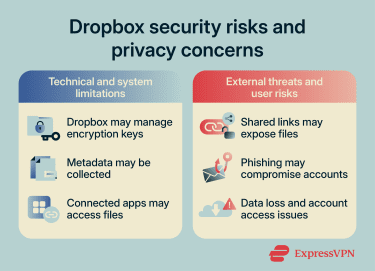
Shared file and link exposure
Shared links and folders can create security risks if permissions are too broad or links reach the wrong people. Sensitive data may accidentally become publicly accessible through weak sharing permissions or poor account security practices.
Research into cloud security by exposure management company Tenable has found that around 9% of publicly accessible cloud storage contains sensitive data, with 97% of that data classified as restricted or confidential. In other words, when cloud storage is exposed, it's very often sensitive information such as documents, credentials, or personal records.
Phishing and account compromise
Dropbox accounts can become targets for cybercriminals. Weak passwords, reused credentials, and phishing attacks remain some of the most common causes of unauthorized account access.
Attackers may attempt to steal login credentials through fake Dropbox emails, fraudulent login pages, or malicious links designed to imitate official Dropbox communications.
Data loss and account access issues
There's always a risk of losing access to files if login credentials are forgotten and recovery methods are outdated or inaccessible. This can become especially problematic if Dropbox is the only place where important documents are stored.
Has Dropbox ever been breached?
Dropbox has experienced security incidents in the past. In 2012, it was affected by a breach involving user login credentials. The full scale became public in 2016, when reports showed that around 68 million Dropbox account records had been exposed. The data included email addresses and hashed, salted passwords. Dropbox said the credentials were likely obtained in 2012 and that it had no indication Dropbox accounts had been improperly accessed. However, the incident still created a risk for users, especially those who reused the same password on other sites.
In 2024, Dropbox disclosed a separate breach affecting Dropbox Sign, its e-signature service formerly known as HelloSign. A threat actor accessed the Dropbox Sign production environment and obtained customer information such as email addresses, usernames, phone numbers, hashed passwords, account settings, API keys, OAuth tokens, and multi-factor authentication (MFA) data. Dropbox said it found no evidence that users' documents, agreements, payment information, or other Dropbox products were accessed.
What data does Dropbox collect?
According to its Privacy Policy, Dropbox collects several types of information to operate its services, improve functionality, maintain security, and meet legal obligations. This includes both information provided directly by users and data generated through normal use of the platform.
Below is a breakdown of what's collected and why:
- Account information: Name, email address, phone number, billing details, and address provided during sign-up, plan upgrades, or security setup (such as 2FA). This is used to manage accounts, process payments, and secure access.
- Files and related content: Files, documents, photos, comments, messages, and data from connected services. Dropbox stores and processes this data to provide cloud storage, syncing, sharing, and collaboration features.
- Contacts: Contact lists may be collected if access is granted. This helps users share files, collaborate, and invite others to use Dropbox services more easily.
- Usage information: Activity inside the account, such as sharing, editing, viewing, creating, and moving files or folders, as well as sending and receiving electronic signature requests and other transactions. This is used to provide, improve, promote, and protect Dropbox services.
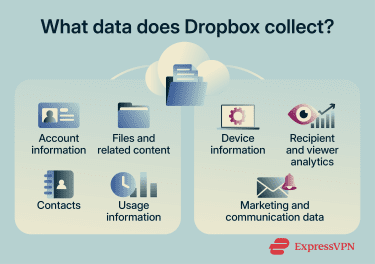
- Device information: IP addresses, browser type, device identifiers, operating system details, and sometimes location data (depending on device settings). This helps detect suspicious activity, fix bugs, and improve security.
- Recipient and viewer analytics: In parts of Dropbox's services that provide analytics to content owners, Dropbox may collect information about viewers, including email addresses, IP addresses, device identifiers, view times, number of views, viewing duration, and which parts of the content were viewed.
- Marketing and communication data: Information about email preferences and interactions with marketing messages, like whether emails are opened or unsubscribed from. This is used to manage communication preferences and send optional product updates.
How Dropbox compares to other cloud storage services
Dropbox is one of the most recognizable cloud storage platforms, but it isn't the only option. Here's how several popular alternatives compare on security, privacy, and collaboration.
Dropbox vs. Google Drive vs. OneDrive
Dropbox, Google Drive, and OneDrive all offer core security features such as encryption in transit and at rest, 2FA, account monitoring, and sharing controls.
Dropbox focuses heavily on file syncing, sharing controls, suspicious activity alerts, version history, and recovery features such as Dropbox Rewind.
Google Drive benefits from broader Google Account security, including Google's sign-in alerts, suspicious activity detection, and recovery tools across Google services.
OneDrive is closely tied to Microsoft accounts and Microsoft 365 security features, including account monitoring, ransomware detection, and file recovery options on some plans.
None of these services should be treated as fully private by default. Files are encrypted, but standard accounts generally don't provide full client-side E2EE. Users who need stronger privacy controls should review each provider's encryption model, sharing settings, recovery options, and differences among various subscription plans before choosing a service.
Who is Dropbox best suited for?
Dropbox is best suited for users who need simple file syncing, easy sharing, collaboration tools, and recovery options like version history or Dropbox Rewind. It works especially well for people who regularly move files between devices or collaborate with others on shared folders.
However, Dropbox may not be the best default choice for users who need full client-side E2EE across all files, strict control over encryption keys, or minimal metadata collection.
Google Drive and OneDrive may be better fits for users who already work heavily within their respective ecosystems. Google Drive suits users who rely on Google services for email, documents, spreadsheets, and collaboration, while OneDrive suits users who work in Windows or Microsoft 365 environments. In both cases, users should still review privacy settings, sharing permissions, account security controls, and any business admin features tied to their plan.
Best practices for using Dropbox
A few simple practices can significantly reduce the risk of unauthorized access, accidental exposure, or data loss.
How to protect shared files
Shared files and folders can become a security risk if access controls are too broad or links are distributed carelessly.
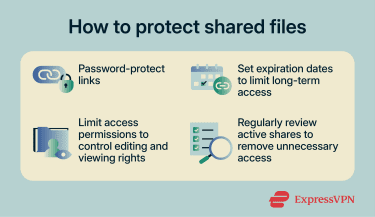
- Use password-protected links: Dropbox offers password protection for shared links on some plans. This adds an extra barrier that helps prevent unauthorized access if a link is exposed or forwarded to unintended recipients.
- Set link expiration dates: Expiration dates automatically disable shared links after a certain period. This reduces long-term exposure and limits the chances of old links remaining accessible indefinitely.
- Limit access permissions: Shared folders can often be configured with different permission levels, including view-only or editing access. Restricting editing privileges helps reduce the risk of accidental file changes or malicious modifications.
- Review active shares regularly: Old shared folders, outdated links, and unused collaborators can create unnecessary security risks over time. Regular reviews help keep access limited to people who still need it.
How to improve Dropbox account security
Improving account security in Dropbox comes down to strengthening login protection, monitoring activity, and reducing exposure from connected devices and networks. These tips help lower the risk of unauthorized access and data theft.
- Use a strong, unique password: Creates a stronger barrier against account compromise. Password managers can help generate and securely store complex passwords.
- Enable 2FA: Doing this adds a second verification step during login, making unauthorized access much more difficult even if credentials are stolen through phishing attacks or data breaches.
- Be mindful of sensitive uploads: Highly sensitive or confidential materials may need stronger protections than standard Dropbox settings provide. For these files, consider additional safeguards such as stricter access controls, stronger authentication, limited sharing, or client-side encryption where available.
- Monitor account activity: Helps identify suspicious behavior such as unfamiliar devices, unusual login locations, or unauthorized sessions. Suspicious activity should be reviewed immediately, and passwords should be changed if compromise is suspected.
- Secure connected devices: Reduces the risk of malware, spyware, and credential theft by keeping operating systems, browsers, and security software updated across all devices connected to the account.
- Use a virtual private network (VPN): Dropbox already encrypts files in transit with TLS, but a VPN can add a separate layer of protection on public or untrusted Wi-Fi. It encrypts internet traffic between the device and the VPN server, which can help reduce exposure to local network threats while signing in, uploading, syncing, or downloading files. A VPN does not replace Dropbox's own encryption or account-security features, but it can provide useful extra protection on shared networks.
FAQ
Is Dropbox safe to download?
Files shared through Dropbox should be treated separately. They are generally safe to download when they come from a trusted sender, but Dropbox can't guarantee that every file uploaded by another user is safe. A shared file could still contain malware, phishing links, or unsafe content, especially if it comes from an unknown sender or an unexpected link.
Can Dropbox employees access my files?
Does Dropbox use end-to-end encryption?
Dropbox offers limited zero-knowledge-style protections on some of its plans, but this isn't the default setup for most accounts.
Is Dropbox secure for legal documents?
However, legal documents can vary in sensitivity. Files involving confidential client information, regulated data, or strict compliance requirements may need additional protections, such as limited access, retention controls, stronger authentication, or client-side encryption. Dropbox's standard encryption protects files during transfer and storage, but it doesn't give standard account holders full control over encryption keys by default.